Showing posts with label photoshop. Show all posts

Wednesday, February 20, 2013

DOOM scene recreated in photoshop


I don't know how many of you played DOOM back in the day, but I was a fan of the computer game. The fact that a scene was recreated in photoshop is nuts. It is very well done and so awesome. What is just as great is you can watch the progress video of this image being made. Props to you Elemental79.


Wednesday, October 24, 2012

Wedding photo photoshopped into a Zombie Wedding-Time Lapse video


This was a wedding photo that was manipulated into a badass zombie photo. The bride and groom are taking out what looks to be their wedding party who are a bunch of zombies. I suppose they won't be hearing the best man toast.


Thursday, June 16, 2011

Meat -Time Lapse video by Stuntkid


Here's another cool video. It's a time lapse of coloring in Photoshop CS 5 by Stuntkid aka Jason Levesque. Back in January I posted an "Inspiration" post on him. He does create good art and this time lapse you get to see him work. I like looking at these videos and feel I can take something out of that I can apply to my work.

Thursday, June 2, 2011

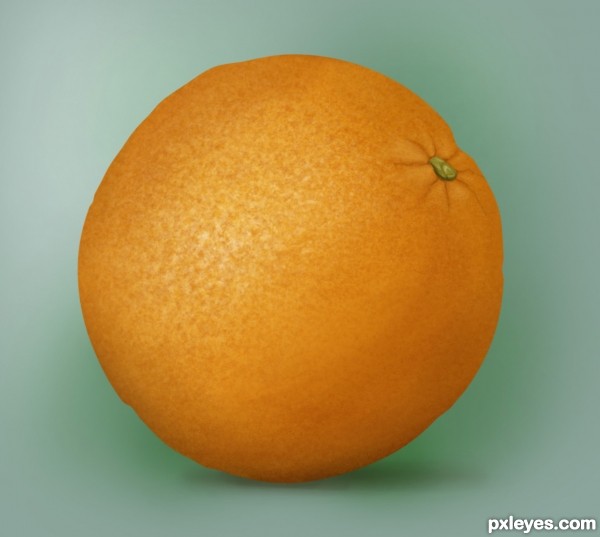
Create a realistic orange in Photoshop


If you want to create an orange from scratch, check out this tutorial. It's a nice step by step tutorial that tells you how to make this orange. It shows the color palette you want to use and how to get the texture. Take a look and see, maybe you can use the techniques for something else.

Read tutorial here

Wednesday, January 26, 2011

365 Days of Creativity -Day 25 & 26

Day 25 - Sketch.

Day 26- For this on, I created an instant band name and cd cover. Here were the rules for this. 

 Random Album Cover

1 - Go to "wikipedia." Hit “random... Read More”
or click http://en.wikipedia.org/wiki/Special:Random
The first random wikipedia article you get is the name of your band.

2 - Go to "Random quotations"
or click http://www.quotationspage.com/random.php3
The last four or five words of the very last quote of the page is the title of your first album.

3 - Go to flickr and click on “explore the last seven days” or click http://www.flickr.com/explore/interesting/7days Third picture, no matter what it is, will be your album cover.

4 - Use photoshop or similar to put it all together. Make sure it’s a square. 500 x 500 pixels is ideal.

I played with a bit in Photoshop and it was fun to do. The quote came from comedian Mitch Hedber. It originally was, "I like rice. Rice is great if you're hungry and want 2000 of something."


The original photo was this.

Friday, January 14, 2011

365 Days of Creativity -Day 14

This is the color version of the line art that I worked on yesterday. I wanted to work on this in Photoshop instead of Illustrator. In my opinion it's ok at best, but maybe I'll enjoy once I take my eyes away from the computer. Maybe it would be interesting to see what it looks like if I did it in Illustrator. Should I work on this for one of my days of "365 Days of Creativity"?


Here's the original sketch.

Monday, January 10, 2011

Create a Dramatic Meteor & Burning City in Photoshop


If you're looking to create an apocalyptic scene for your next project, here's a pretty good tutorial on how to do so. You can view the step by step process at PSD Vault and you can form your own destruction in Photoshop.

Saturday, January 1, 2011

365 Days of Creativity- First 2011 illustration

Happy New Year, Everyone! I hope you had a fun holiday. This is the first post of the new year. Resolutions are silly, but goals are not. You can start a goal anytime, but the one I have in mind seems right to start on January 1st. I want to create a new sketch,design, or illustration everyday and post it. I want to put some work into it, because I could create a bunch of terrible sketches. It will be fun and difficult, but let's see how close I can come with 365 days of work. Below is the first. I wanted to create a geisha, so I drew one. All of the work was done in Photoshop, but the vector art was taken from an illustrator file. I hope you like it.
 You can view a close up on my deviant art page here: http://joebarondesign.deviantart.com/art/Geisha-191806520

Wednesday, March 31, 2010

Photoshop CS5 Sneak Peek!

Watch this video to see what they are doing for the next Photoshop CS.

Monday, February 22, 2010

Watercolor Tutorial-Add another element to your design

Here is a video on creating some watercolor ink washes for your designs. This video will take a step by step on how to create the ink wash and then applying it in Photoshop. I've used this technique and added it to some designs. I even used the ink to create splatters for my arsenal of design tools. After I post this, I'm going to create some watercolor effects. Enjoy!

Tuesday, February 16, 2010

Sexy Photo Effect In Photoshop


Here's a tutorial that can create a nice photo for your designs. The tutorial isn't difficult to create, but it can add a wonderful element to your ad or other design that you're working on. Having a perfect lighting effect will enhance a good design to an amazing art piece.


Goddess Photo Effect Click Here